Hybrid Double Buffering
This article explains how to set up the DMA used by the Hybrid Double Buffering strategy. The DMA copies completed rendering blocks from internal RAM to the external back buffer using burst writes, reducing external memory access by the CPU and leaving more bandwidth available for the display controller.
For an introduction to the Hybrid Double Buffering strategy and its benefits, see the Hybrid Double Buffering section of the Framebuffer article.
The TouchGFX HAL code generated by STM32CubeMX assumes that a DMA channel is preconfigured in STM32CubeMX. The channel must also be passed to TouchGFXGeneratedHAL from its initialize function.
DMA Configuration
The Hybrid Double Buffering strategy is only supported on STM32 microcontrollers with a DMA capable of performing 2D block copy operations. This includes most recent microcontrollers with external memory interfaces:
| MCU | DMA type |
|---|---|
| STM32H7R | HPDMA |
| STM32N6 | HPDMA |
| STM32H7 | MDMA |
| STM32U5 | GPDMA |
| STM32H5 | GPDMA |
Older microcontrollers like STM32F4 and STM32F7, and smaller microcontrollers like STM32C0, STM32G0, STM32C5 are not supported. The DMA controllers included in these products cannot perform 2D block copy operations.
The configuration of the DMA in STM32CubeMX is different for the three types of DMA. See the relevant section below.
A DMA channel must be reserved for TouchGFX and configured. The requirements are listed below:
- Interrupt at End of repeated block
- Source and destination data width is word (32-bit)
- Source and destination address increment
- 2D addressing enabled
HPDMA configuration
Open the HPDMA1 configuration under System Core. Select an unused channel with 2D addressing capability.
For the STM32H7S78 Discovery board we have selected channel 12 (channel 15 is used by BSP code).
Set up the channel as illustrated below. The important settings are the source and destination data settings, enabled 2D addressing, and transfer event generation at the end of the repeated block.
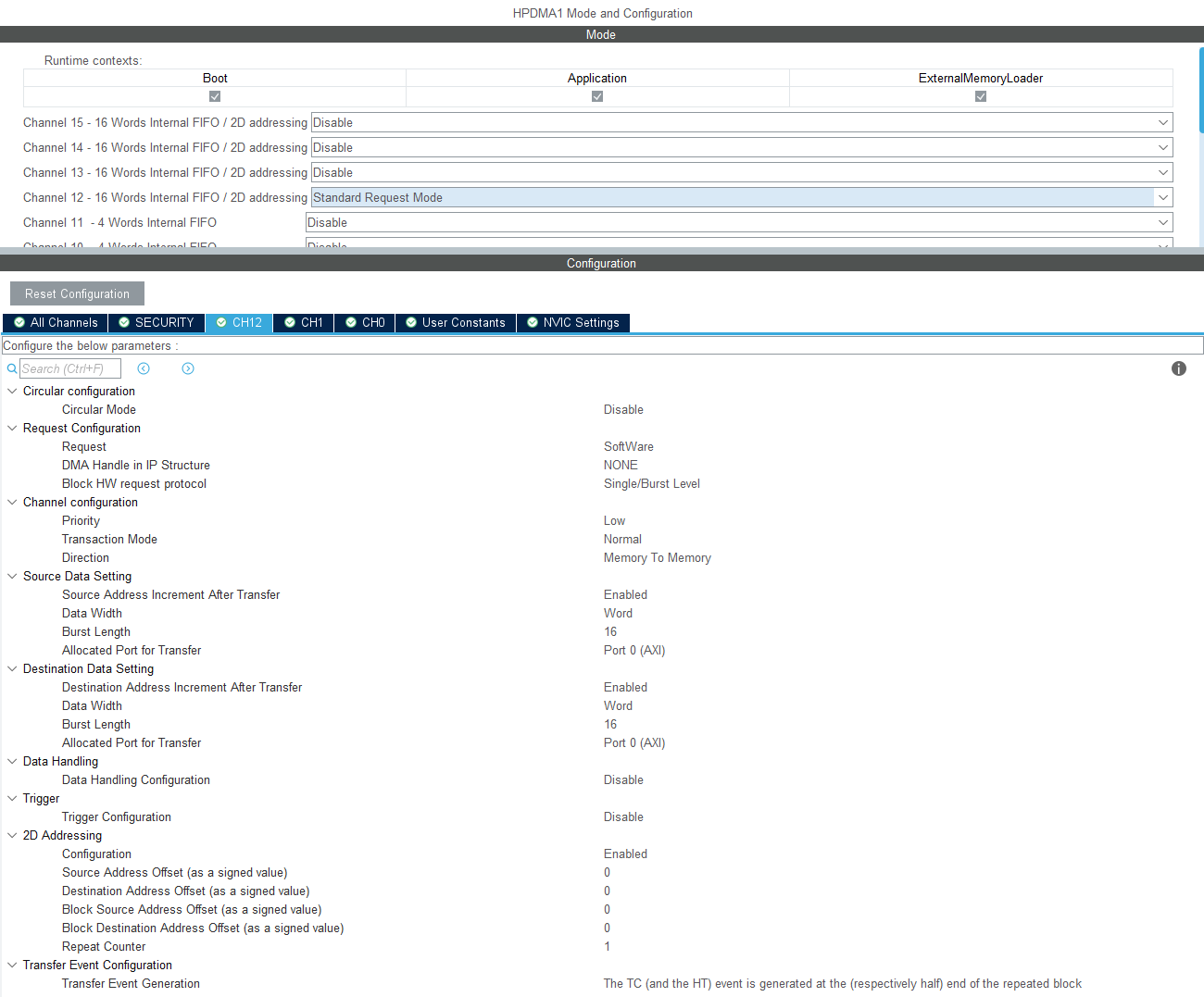
HPDMA settings for Hybrid Double Buffering
The HPDMA channel 12 interrupt must also be enabled in the NVIC section:
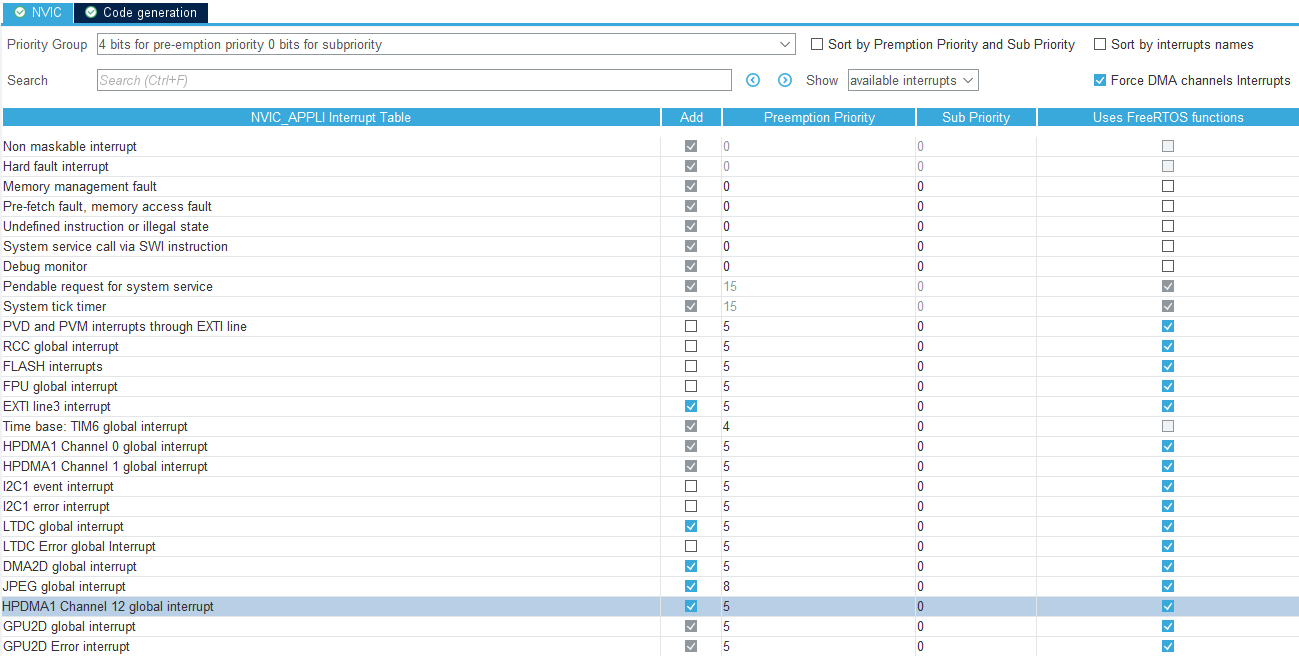
Enable HPDMA channel interrupt
STM32CubeMX generates a handle for the HPDMA channel in main.c. We need to pass the handle to TouchGFXGeneratedHAL, so it can be used for copying the framebuffer blocks.
This is done in TouchGFXHAL.cpp:
TouchGFX/target/TouchGFXHAL.cpp
#include "main.h"
extern "C" DMA_HandleTypeDef handle_HPDMA1_Channel12;
...
void TouchGFXHAL::initialize()
{
    setHybridTransferDMAChannel(&handle_HPDMA1_Channel12);
    ...
}
GPDMA configuration
The GPDMA configuration is very similar to the HPDMA configuration:
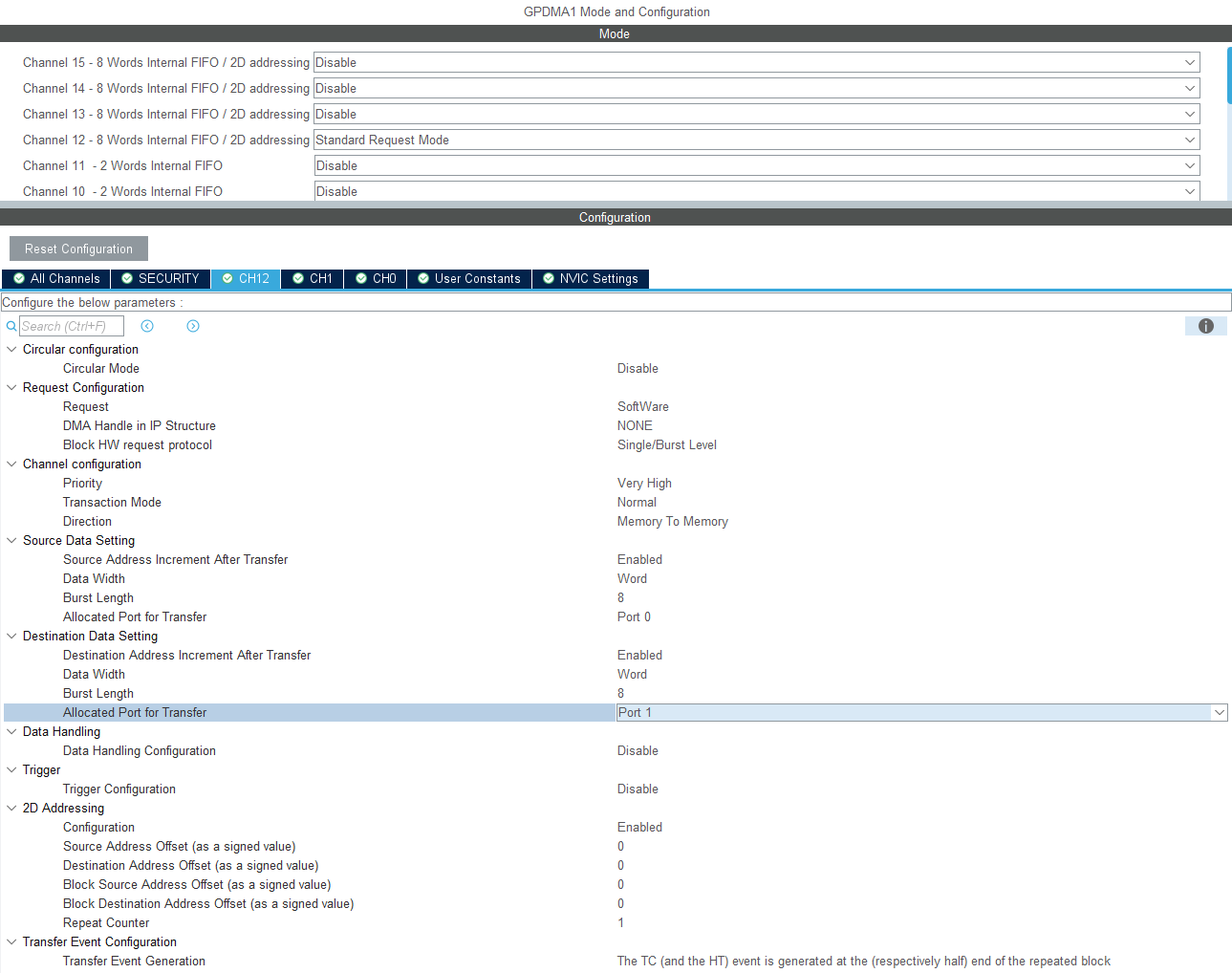
GPDMA settings for Hybrid Double Buffering
Channel 12 is selected.
The GPDMA channel interrupt must also be enabled in the NVIC section:
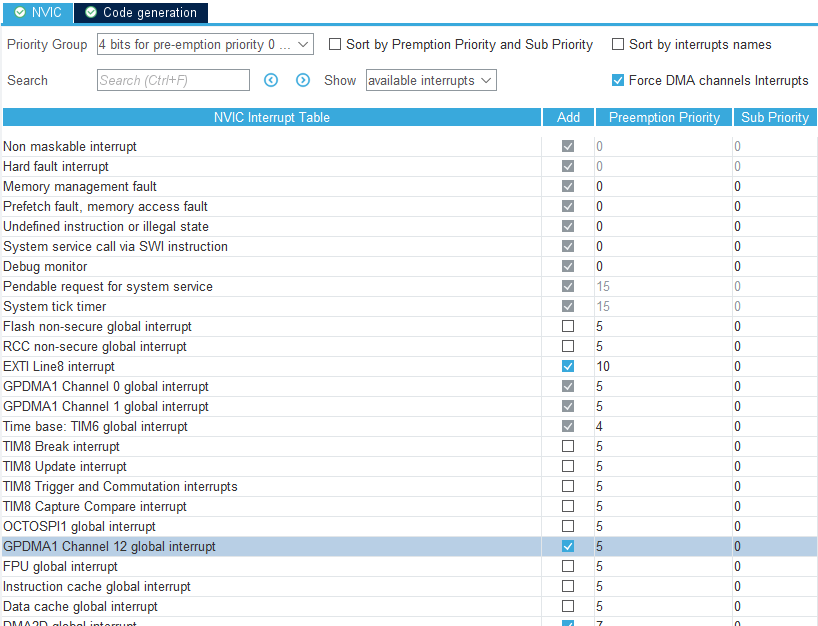
Enable GPDMA channel interrupt
STM32CubeMX generates a handle for the GPDMA channel in main.c. We need to pass the handle to TouchGFXGeneratedHAL, so it can be used for copying the framebuffer blocks.
This is done in TouchGFXHAL.cpp:
TouchGFX/target/TouchGFXHAL.cpp
#include "main.h"
extern "C" DMA_HandleTypeDef handle_GPDMA1_Channel12;
...
void TouchGFXHAL::initialize()
{
    setHybridTransferDMAChannel(&handle_GPDMA1_Channel12);
    ...
}
MDMA configuration
The MDMA channel setup differs from the HPDMA and GPDMA configurations. The important parts are the source and destination data settings, and the trigger mode.
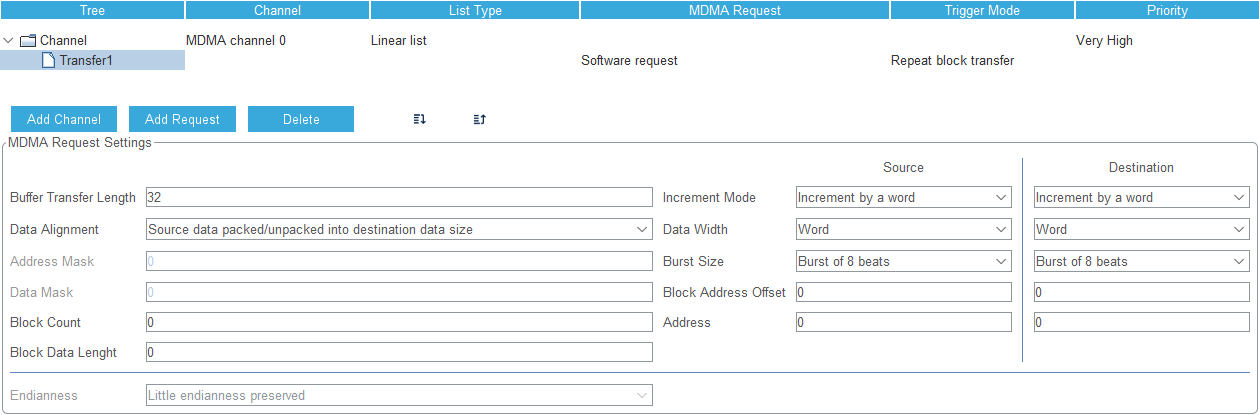
MDMA settings for Hybrid Double Buffering
The MDMA global interrupt must also be enabled in the NVIC section:
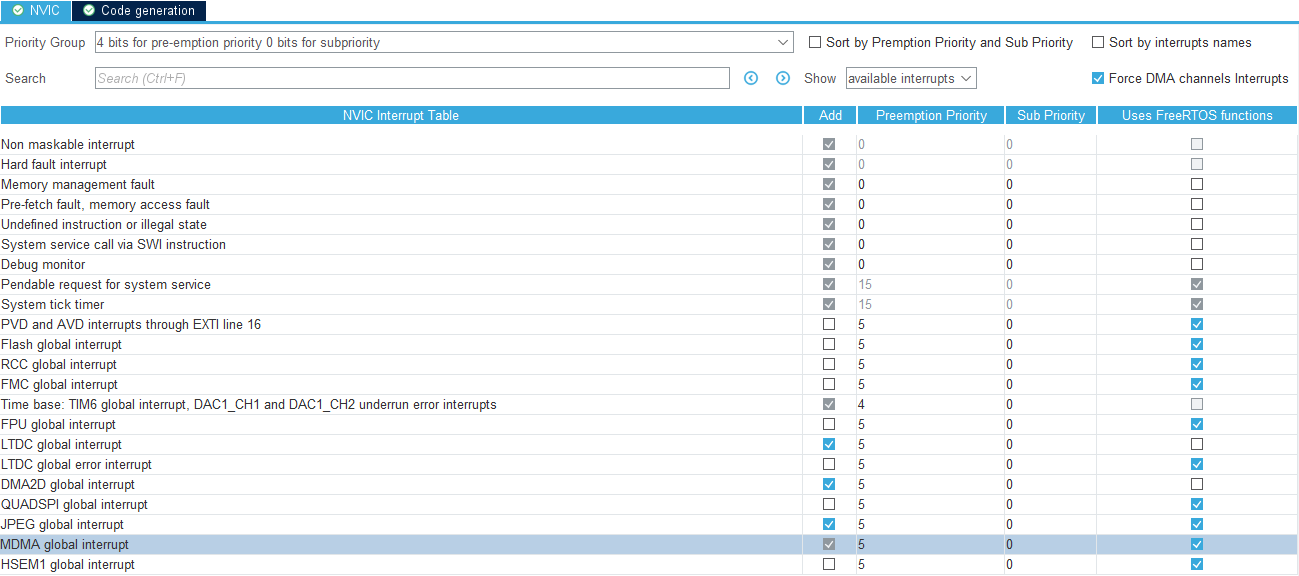
Enable MDMA interrupt
STM32CubeMX generates a handle for the MDMA channel in main.c. We need to pass the handle to TouchGFXGeneratedHAL, so it can be used for copying the framebuffer blocks.
This is done in TouchGFXHAL.cpp:
TouchGFX/target/TouchGFXHAL.cpp
#include "main.h"
extern "C" MDMA_HandleTypeDef hmdma_mdma_channel15_sw_0;
...
void TouchGFXHAL::initialize()
{
    setHybridTransferDMAChannel(&hmdma_mdma_channel15_sw_0);
    ...
}