滾輪
滾輪(Scroll Wheel)是包含多個專案的可捲動功能表,滾動流覽功能表中的專案時,這些專案會動態更新,且被選中的專案將突出顯示。 啟用回應與滾輪交互的程式碼後,可基於與輪中專案的交互呼叫不同的callback函數。

在模擬器中運行的滾輪
小部件組
滾輪位於TouchGFX Designer中的Containers小部件組中。
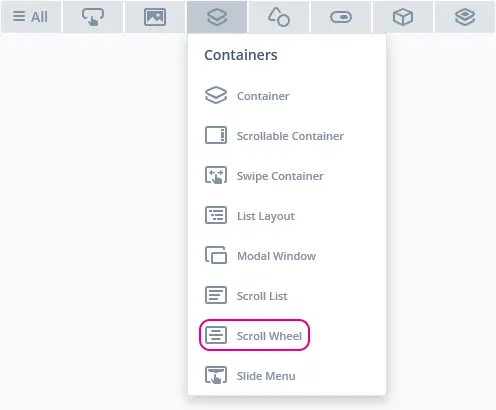
TouchGFX Designer中的滾輪
屬性
TouchGFX Designer中滾輪的屬性。
| 屬性組 | 屬性組 |
|---|---|
| Name | 小部件的名稱。 Name是TouchGFX Designer和程式碼中使用的唯一識別碼。 |
| Type | 類型指定滾輪方向為垂直方向或水平方向。 |
| Location | X 和Y 指定小部件左上角相對于其父的位置。 W 和 H 指定小部件的寬度和高度。 鎖定指定小部件是否應鎖定為其當前的X、Y、W和H。 如果鎖定小部件,還會禁止通過螢幕與小部件進行交互。 可見 指定小部件的可見性。 如果將小部件標記為不可見,還會禁止通過螢幕與小部件進行交互。 |
| Item Template | 專案範本 指定用作範本的CustomContainer。 選項數 指定滾動清單中存在的專案數。 首選專案 指定首先選擇哪個專案。 使用已選樣式範本 指定是否為所選專案使用單獨的範本。 已選樣式範本 指定用作選定範本的CustomContainer。 |
| List Appearance | 迴圈 指定到達列表末尾後,滾輪中的專案是否將迴圈。 選中項偏移量 指定選定專案的位置。 專案邊距 指定專案之間的間距。 前方額外尺寸和後方額外尺寸 指定顯示已選樣式範本的區域的大小。 前邊距和後邊距指定顯示已選樣式範本的區域前後的邊距大小。 |
| Animation | 緩動和緩動選項指定動畫使用的緩動方程。 Swipe Acc. 和 Drag Acc. 指定滾動時的加速度。 |
| Mixin | 可拖動 指定在運行時小部件是否可拖動。 ClickListener 指定小部件被點擊時是否會呼叫callback函數。 MoveAnimator 指定小部件是否可繪製 X 和 Y 值變化的動畫。 |
專案範本
滾動列表中的專案基於名為“專案範本”的概念,專案範本屬於CustomContainer,用作滾輪中各專案圖形元素的基礎。 為了突出顯示所選專案,滾輪包含用於選擇名為“已選樣式範本”的專案範本的選項,已選樣式範本僅可用於已選專案。 創建滾輪之前,應為專案範本以及已選專案範本(若啟用)創建CustomContainer。
創建滾輪後,可在專案範本屬性下選擇CustomContainer。 為專案範本選擇自訂容器時,會調整滾輪大小,以適應所選自訂容器不在可滾動方向上的的尺寸屬性(垂直方向的寬度、水平方向的高度)。 更改其他尺寸屬性(垂直方向的高度、水平方向的寬度)決定了可見的專案數。
交互
下面的部分介紹了滾輪支援的操作和觸發條件。
操作
| 標準小部件操作 | 說明 |
|---|---|
| Hide widget | 隱藏小部件(將可見性設置為false)。 |
| Show widget | 使隱藏的小部件可見(將可見性設置為true)。 |
觸發條件
滾輪不會產生任何觸發條件。
性能
滾輪為Container類型,預設情況下不會出現在繪圖鏈中。 因此,性能完全取決於子部件的繪圖性能。
關於文字繪製性能的更多資訊,請閱讀通用UI元件性能一節。
範例
生成程式碼
在生成的視圖基類的程式碼中,可以查看TouchGFX Designer是如何創建滾輪的。
Screen1ViewBase.cpp
#include <gui_generated/screen1_screen/Screen1ViewBase.hpp>
#include "BitmapDatabase.hpp"

Screen1ViewBase::Screen1ViewBase() :
    updateItemCallback(this, &Screen1ViewBase::updateItemCallbackHandler)
{
    scrollWheel.setPosition(140, 10, 200, 252);
    scrollWheel.setHorizontal(false);
    scrollWheel.setCircular(false);
    scrollWheel.setEasingEquation(touchgfx::EasingEquations::backEaseIn);
    scrollWheel.setSwipeAcceleration(10);
    scrollWheel.setDragAcceleration(10);
    scrollWheel.setNumberOfItems(60);
    scrollWheel.setSelectedItemOffset(100);
    scrollWheel.setSelectedItemExtraSize(0, 0);
    scrollWheel.setSelectedItemMargin(0, 0);
    scrollWheel.setDrawableSize(50, 3);
    scrollWheel.setDrawables(scrollWheelListItems, updateItemCallback,
                              scrollWheelSelectedListItems, updateItemCallback);
    scrollWheel.animateToItem(0, 0);

    add(scrollWheel);
}

void Screen1ViewBase::setupScreen()
{
    scrollWheel.initialize();
    for (int i = 0; i < scrollWheelListItems.getNumberOfDrawables(); i++)
    {
        scrollWheelListItems[i].initialize();
    }
    for (int i = 0; i < scrollWheelSelectedListItems.getNumberOfDrawables(); i++)
    {
        scrollWheelSelectedListItems[i].initialize();
    }
}

void Screen1ViewBase::updateItemCallbackHandler(touchgfx::DrawableListItemsInterface* items, int16_t containerIndex, int16_t itemIndex)
{
    if (items == &scrollWheelListItems)
    {
        touchgfx::Drawable* d = items->getDrawable(containerIndex);
        TextContainer* cc = (TextContainer*)d;
        scrollWheelUpdateItem(*cc, itemIndex);
    }
    else if (items == &scrollWheelSelectedListItems)
    {
        touchgfx::Drawable* d = items->getDrawable(containerIndex);
        TextCenterContainer* cc = (TextCenterContainer*)d;
        scrollWheelUpdateCenterItem(*cc, itemIndex);
    }
}
Tip
scrollWheel.invalidate() 以強制重繪。用戶程式碼
設置完滾輪的圖形元素及其屬性後,可編寫使用者程式碼更新滾輪中的專案。 下文給出了由TouchGFX Designer生成的Screen1ViewBase類的標頭檔:
Screen1ViewBase.hpp
class Screen1ViewBase : public touchgfx::View
{
public:
    Screen1ViewBase();
    virtual ~Screen1ViewBase() {}
    virtual void setupScreen();

    virtual void scrollWheel1UpdateItem(CustomContainer1& item, int16_t itemIndex)
    {
        // Override and implement this function in Screen1
    }

    virtual void scrollWheel1UpdateCenterItem(CustomContainer2& item, int16_t itemIndex)
    {
        // Override and implement this function in Screen1
    }

protected:
    FrontendApplication& application() {
        return *static_cast<FrontendApplication*>(Application::getInstance());
    }

    touchgfx::BoxWithBorder boxWithBorder1;
    touchgfx::ScrollWheelWithSelectionStyle scrollWheel1;
    touchgfx::DrawableListItems<CustomContainer1, 6> scrollWheel1ListItems;
    touchgfx::DrawableListItems<CustomContainer2, 2> scrollWheel1SelectedListItems;

private:
    void updateItemCallbackHandler(DrawableListItemsInterface* items, int16_t containerIndex, int16_t itemIndex);
    touchgfx::Callback<Screen1ViewBase, DrawableListItemsInterface*, int16_t, int16_t> updateItemCallback;

};
TouchGFX Designer生成滾輪程式碼時,會創建上文中突出顯示的函數 scrollWheel1UpdateItem 和 scrollWheel1UpdateCenterItem,使用者可使用這些函數覆蓋和更新滾輪中的專案。
最終會為生成滾輪 UpdateItem 函數,並可實現該函數以更新包含的專案, UpdateCenterItem 函數會基於已選樣式範本更新專案,因此,僅當選擇使用已選樣式範本時,才會生成此函數。 除了更新不同專案之外,這兩個函數還包含相同的參數,用於更新滾輪中的專案。
參數 itemIndex 包含專案的索引值,該值用於標識正在更新的專案。 參數 item 是對滾輪中的可見專案的引用。 更新參數 item 的外觀會更新為滾輪中可見專案的渲染。
下文給出了在用戶程式碼檔 Screen1View.hpp 和 Screen1View.cpp 中實現 scrollWheel1UpdateItem 和 scrollWheel1UpdateCenterItem 的範例:
Screen1View.hpp
#ifndef SCREEN1_VIEW_HPP
#define SCREEN1_VIEW_HPP

#include <gui_generated/screen1_screen/Screen1ViewBase.hpp>
#include <gui/screen1_screen/Screen1Presenter.hpp>

class Screen1View : public Screen1ViewBase
{
public:
    Screen1View();
    virtual~Screen1View() {}
    virtual void setupScreen();
    virtual void tearDownScreen();

    virtual void scrollWheel1UpdateItem(CustomContainer1& item, int16_t itemIndex);
    virtual void scrollWheel1UpdateCenterItem(CustomContainer2& item, int16_t itemIndex);
protected:
};

#endif // SCREEN1_VIEW_HPP
Screen1View.cpp
#include <gui/screen1_screen/Screen1View.hpp>

Screen1View::Screen1View()
{

}

void Screen1View::setupScreen()
{
    Screen1ViewBase::setupScreen();
}

void Screen1View::tearDownScreen()
{
    Screen1ViewBase::tearDownScreen();
}

void Screen1View::scrollWheel1UpdateItem(CustomContainer1& item, int16_t itemIndex)
{
    item.setIndex(itemIndex);
}

void Screen1View::scrollWheel1UpdateCenterItem(CustomContainer2& item, int16_t itemIndex)
{
    item.setIndex(itemIndex);
}
在標頭檔 Screen1View.hpp 中,會覆蓋 scrollWheel1UpdateItem 和 scrollWheel1UpdateCenterItem 函數,隨後會在 Screen1View.cpp 中實現這些函數。
本範例的目標是更新具有可見專案索引值的專案範本中的文字,與本部分開頭給出的範例相似。 由於專案範本和所選樣式範本均基於CustomContainer,因此會為這兩個CustomContainer創建 setIndex 函數。 setIndex 函數能夠獲取 itemIndex 參數並更新專案範本和所選樣式範本中的文字。 為專案呼叫 setIndex 會更新可見專案的外觀,從而會顯示其索引值。
TouchGFX Designer範例
如需進一步瞭解滾輪,請嘗試在TouchGFX Designer中使用下列UI範本創建新應用:
TouchGFX Designer中的滾輪和清單UI範本