SPI
The following scenario shows, generally, the steps involved in creating a TouchGFX driver when selecting "Custom" display interface in the TouchGFX generator using SPI. The steps involved are similar to that of other display interfaces where the MCU lacks an embedded display controller, e.g. through FMC over an Intel 8080 interface.
Once the SPI peripheral is configured in CubeMX the TouchGFX Generator can be used to generate a HAL, using a "custom" display interface, that allows developers to transfer the updated parts of the framebuffer to a connected display using a proprietary driver that developers write themselves. Figure X shows a TouchGFX Generator configuration in which selecting Custom display interface will allow the generated code to support the transfer of the updated parts of the framebuffer to the display.
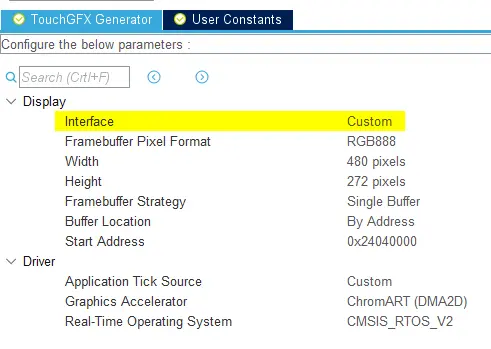
專案內容
Generally, for displays with embedded GRAM such as 8080 or SPI displays, the driver is structured as follows:
- Based on area of the framebuffer to be redrawn, move the "display cursor" to a place in GRAM that matches this.
- 準備將傳入的像素資料寫入GRAM。
- 傳送像素資料。
Transfering the framebuffer
When an area of the framebuffer has been updated, the TouchGFX Engine will call HAL::flushFrameBuffer.
React to signal (S?) from TouchGFX Engine.
void  TouchGFXHAL::flushFrameBuffer(const Rect& rect)
{
    /* Set Cursor */
    __ST7789H2_SetDisplayWindow(rect.x, rect.y, rect.width, rect.height);

    /* Prepare to write to LCD RAM */
    ST7789H2_WriteReg(ST7789H2_WRITE_RAM, (uint8_t*)NULL, 0);

    /* Send Pixels */
    this->copyFrameBufferBlockToLCD(rect);
}
以下__ST7789H2_SetDisplayWindow函數用以寫入特定寄存器來設定GRAM中虛擬「游標」的x和y座標,對於使用GRAM來說這很常見的用法。
extern "C"
void __ST7789H2_SetDisplayWindow(uint16_t Xpos, uint16_t Ypos, uint16_t Width, uint16_t Height)
{
    uint8_t   parameter[4];

    /* CASET: Column Address Set */
    parameter[0] = 0x00;
    parameter[1] = Xpos;
    parameter[2] = 0x00;
    parameter[3] = Xpos + Width - 1;
    ST7789H2_WriteReg(ST7789H2_CASET, parameter, 4);

    /* RASET: Row Address Set */
    parameter[0] = 0x00;
    parameter[1] = Ypos;
    parameter[2] = 0x00;
    parameter[3] = Ypos + Height - 1;
    ST7789H2_WriteReg(ST7789H2_RASET, parameter, 4);
}
以下TouchGFXHAL::copyFrameBufferBlockToLCD函數是一個私有函數,該函數一次發送一行更新過的區域(Rect),並更新相應的影像緩衝區指標。
void TouchGFXHAL::copyFrameBufferBlockToLCD(const Rect rect)
{
    __IO uint16_t* ptr;
    uint32_t height;

    // Use default implementation (CPU copy!).
    // This can be accelerated using regular DMA hardware
    for (height = 0; height < rect.height ; height++)
    {
        ptr = getClientFrameBuffer() + rect.x + (height + rect.y)  * BSP_LCD_GetXSize();
        LCD_IO_WriteMultipleData((uint16_t*)ptr, rect.width);
    }
}
Returning from flushFrameBuffer
Once the function returns, TouchGFX Engine returns to its. If developers desire to use DMA to perform these transfers, then they must ensure that HAL::flushFrameBuffer(Rect& rect) does not return by waiting on a semaphore that is signaled by a DMA Completed interrupt.