빌드 시스템으로서의 CMake
서론
TouchGFX V4.25.0 및 STM32CubeMX V6.14.0 이후로 TouchGFX 프로젝트는 CMake 빌드 시스템을 지원합니다. 이 시나리오는 CMake를 빌드 시스템으로 사용해서 TouchGFX 프로젝트를 설정, 빌드, 디버깅하는 방법을 보여줍니다.
CMake에 관해 자세히 알아보려면 공식 CMake 문서를 참조하세요.
전제 조건
STM32Cube 명령줄 도구 체인(STM32CubeCLT)을 다운로드하는 것을 권장합니다. 여기에는 STM32CubeMX으로 생성된 CMake 프로젝트를 구성, 빌드, 디버깅하는 데 필요한 모든 도구(컴파일러, 디버거, CMake, Ninja 등)가 포함되어 있습니다.
Note
STM32CubeMX에서 도구 체인 변경
우선 STM32CubeMX의 "Project Manager" 탭에서 도구 체인을 CMake로 변경합니다. 그런 다음 코드를 생성합니다.
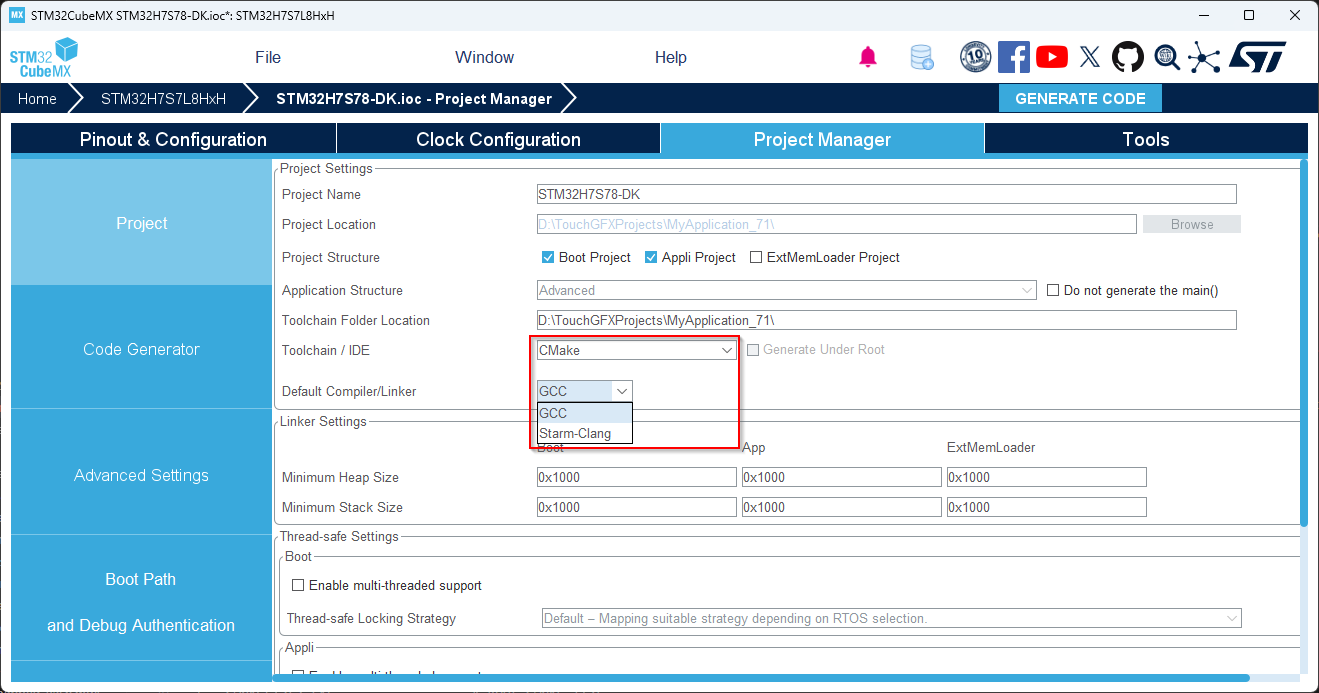
CMake 도구 체인이 선택됨
TouchGFX Designer에서 코드 생성
버튼을 누르거나 키보드에서 F4 키를 눌러 TouchGFX Designer에서 코드를 생성하여 프로젝트에 TouchGFX용 코드를 추가합니다.
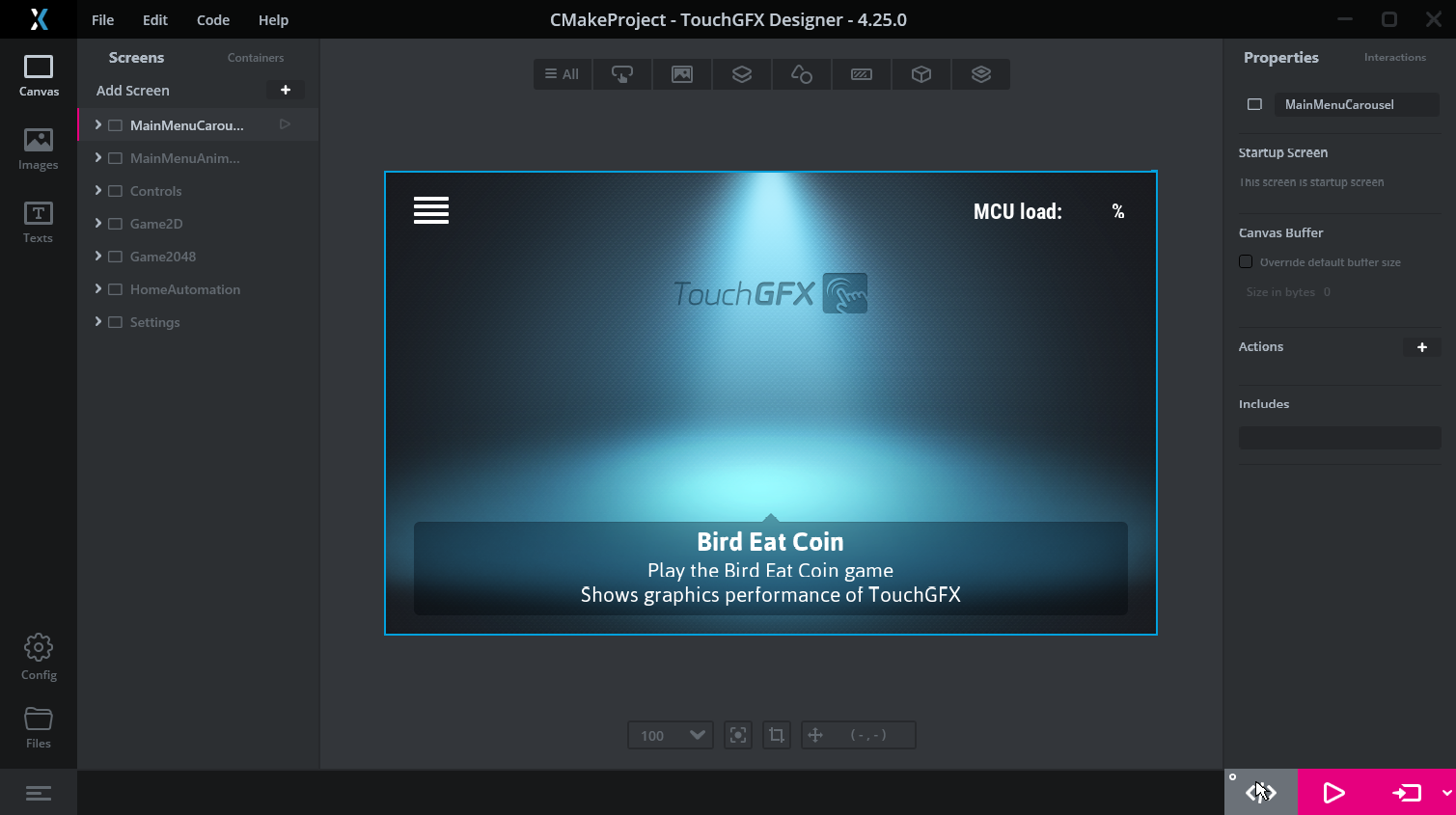
코드 생성
프로젝트 구조
STM32CubeMX 및 TouchGFX Designer에서 코드를 생성하고 나면 아래와 유사한 파일 구조가 생성됩니다:
├───<project-name>.ioc
├───CMakeLists.txt                  # Root CMake list
├───CMakePresets.json               # Predefined CMake configurations
├───<mcu-part-number>.ld            # Generated linker scripts, e.g., STM32U5g9xx_FLASH.ld
├───cmake
|   ├───gcc-arm-none-eabi.cmake     # CMake toolchain file
|   ├───starm-clang.cmake           # CMake toolchain file
│   ├───stm32cubemx
│   │   └───CMakeLists.txt          # STM32CubeMX CMake list
│   └───touchgfx
│       └───CMakeLists.txt          # TouchGFX CMake list
├───Core
├───Drivers
├───Middlewares
└───TouchGFX
프로젝트 루트 폴더에 있는 CMakeLists.txt 파일은 사용자가 수정할 수 있으며 CMake 구성의 진입점입니다. CMakePresets.json 파일은 프로젝트를 위한 다양한 구성 사전 설정(예: 디버그, 릴리스)을 정의합니다.
stm32cubemx/CMakeLists.txt 목록 파일은 STM32CubeMX에서 생성된 파일을 관리하며 touchgfx/CMakeLists.txt 파일은 TouchGFX용 GUI 파일을 관리합니다. 따라서 프로젝트에 GUI 요소 및 애셋을 추가하거나 삭제할 경우 변경 사항이 빌드 시스템에 반영되도록 TouchGFX Designer에서 코드를 다시 생성하는 것이 중요합니다.
TouchGFX Designer에서 처음으로 코드를 생성할 때는 루트 CMakeLists.txt에 다음 라인을 추가하려 시도하며 그렇게 되면 빌드 시스템에 TouchGFX가 포함됩니다.
CMakeLists.txt
...
# Add STM32CubeMX generated sources
add_subdirectory(cmake/stm32cubemx)

# Add touchgfx generated sources and libraries
add_subdirectory(cmake/touchgfx)
...
STM32CubeMX CMake 목록에 MCU용 HAL과 드라이버에 대한 종속성이 정의되어 있으므로 STM32CubeMX CMake 목록 뒤에 TouchGFX CMake 목록 파일이 포함되어야 합니다.
Caution
링커 스크립트 업데이트
STM32CubeMX로 코드를 생성하면 GCC와 ST Arm Clang 모두와 호환되는 하나 이상의 링커 스크립트가 생성됩니다. STM32CubeMX 버전 6.16 이상을 지원하던 TouchGFX Designer에서 사용가능한 TouchGFX Board Setups의 새로운 버전은 필요한 수정 사항이 반영된 링커 스크립트가 포함되어 있습니다. 이 링커 스크립트는 CMake, STM32CubeIDE 및 TouchGFX Designer의 'Run Target' 기능에 사용됩니다.
다른 TouchGFX Board Setups의 경우, 프로젝트 요구 사항을 충족하기 위해 링커 스크립트를 수동으로 수정해야 합니다. STM32CubeIDE 툴체인에 대해 이미 정의된 링커 스크립트를 참조로 사용할 수 있습니다. 링커 스크립트는 코드 생성 시 STM32CubeMX에 의해 재생성되지 않으므로, 링커 스크립트에 적용된 모든 수정 사항은 유지됩니다.
또는 사용자가 생성된 CMake 툴체인 파일 gcc-arm-none-eabi.cmake 또는 starm-clang.cmake를 업데이트하여 기본 스크립트 대신 링커가 사용할 다른 링커 스크립트를 지정할 수도 있습니다. 예를 들어, 이미 정의된 STM32CubeIDE 링커 스크립트를 사용하는 방법은 다음과 같습니다.
gcc-arm-none-eabi.cmake
...
set(CMAKE_C_LINK_FLAGS "${TARGET_FLAGS}")
set(CMAKE_C_LINK_FLAGS "${CMAKE_C_LINK_FLAGS} -T \"${CMAKE_SOURCE_DIR}/STM32CubeIDE/STM32U5G9ZJTXQ_FLASH.ld\"")
...
프로젝트 빌드
코드를 생성하고 TouchGFX가 빌드 시스템의 일부분으로 포함되도록 한 다음 STM32 VS Code Extension을 사용해 프로젝트를 빌드 및 디버깅할 수 있습니다. STM32 VS Code Extension은 개발자가 STM32CubeCLT를 사용해 CMake 프로젝트를 빌드하고 목표대로 이를 디버깅할 수 있게 하는 유용한 도구입니다.
먼저 Setup STM32Cube project(s)를 선택하여 STM32 VS Code Extension으로 프로젝트를 설정해야 합니다.
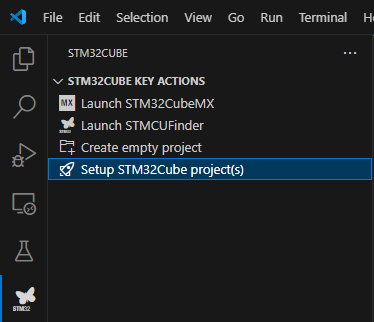
CMake 프로젝트 가져오기
이 확장 프로그램은 작업 공간을 스캔하여 선택된 도구 체인과 대상 플랫폼을 결정합니다. 확장 프로그램에 의해 다양한 VSCode 작업과 실행 구성이 VSCode 메타데이터 폴더인 .vscode/에 생성될 수 있습니다. 이는 프로젝트를 빌드, 정리, 플래싱, 디버깅하는 데 사용됩니다. 또는, CMake를 직접 사용하여 프로젝트를 구성 및 빌드하기 위해 CMake VS Code Extension 또는 명령줄을 사용할 수도 있습니다.